

Your salary can look straightforward on an offer letter and still produce a different bank deposit. A gross to net pay calculator shows how that gap develops, but the result depends on more than annual pay. Pay frequency, filing details, pre-tax benefits, withholding, and other deductions all affect the estimate.
The calculation follows a sequence: eligible pre-tax deductions adjust wages used for certain tax calculations, taxes are withheld, and post-tax deductions reduce the remaining amount. Withholding is money paid toward your tax obligation during the year, not a guarantee of what you’ll owe or receive when you file.
This guide explains each step from gross earnings to estimated take-home pay, which personal and payroll details affect the result, and how to use a calculator for paycheck planning. It also covers why an estimate may differ from your paystub or final tax bill, so you can use it as a practical guide rather than a promise.
Key Takeaways
- Learn what gross pay and net pay include, and why take-home pay may reflect more than tax withholding.
- See how a gross to net pay calculator estimates take-home pay, including how progressive federal tax brackets work.
- Understand why a calculator result may differ from your paycheck or final tax liability, and which assumptions to check first.
- Gather your pay type, pay frequency, and deduction details before entering information for a more useful estimate.
- Compare estimates with actual pay for the same pay period, then use the result as a planning reference.
What Does Gross to Net Pay Mean on a Paycheck?
Gross-to-net pay is the process of starting with earnings before payroll deductions, subtracting applicable taxes and other deductions, and arriving at the amount paid to you. Gross pay is the starting amount; net pay is what remains, often called take-home pay. The difference can include taxes, benefit premiums, retirement contributions, and other payroll deductions. This payroll overview explains how earnings, deductions, and net pay fit into the broader payroll process.
A paycheck estimate helps you understand a particular pay period. It isn’t a complete annual tax calculation or a tax return. Withholding is money sent toward taxes during the year; your final tax liability is determined separately when you file. A gross to net pay calculator estimates a paycheck from the information entered, so its result may differ from your eventual tax outcome.
Gross pay, taxable wages, and net pay are different amounts
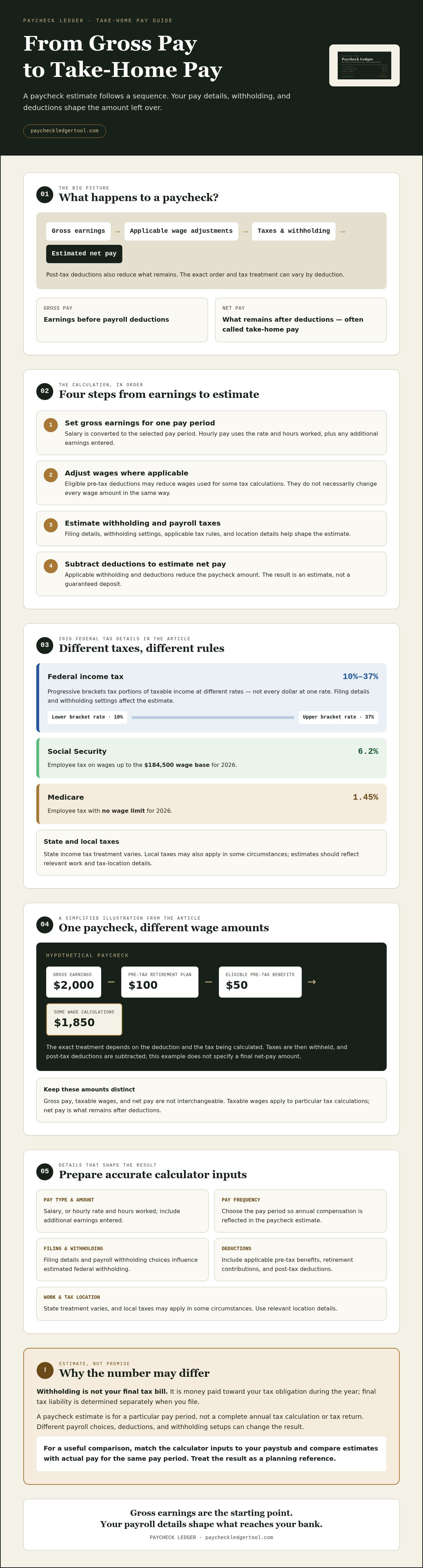
Consider a hypothetical paycheck with $2,000 in gross earnings. If you contribute $100 to a pre-tax retirement plan and pay $50 for eligible pre-tax benefits, some wage calculations may start with $1,850 rather than the full $2,000. The exact treatment depends on the deduction and the tax being calculated.
Taxes are then withheld, and any post-tax deductions are subtracted to arrive at net pay. Taxable wages are the amounts used to calculate particular taxes; they aren’t necessarily the same as gross pay. Net pay is what remains after deductions, so it isn’t the same as taxable income either. This example shows the sequence, not a universal paycheck formula.
Why your gross salary is not your paycheck amount
Your salary describes compensation over a period, while a paycheck covers a specific pay period. Federal and state tax withholding, Social Security, and Medicare can reduce that period’s gross earnings. Elected workplace benefits, such as health coverage or retirement contributions, may reduce the payout further. Employees can have different deductions and withholding setups.
Filing status and payroll choices can also affect estimated withholding. Pay frequency matters because annual compensation is divided across pay periods, and the withholding on each check depends on the payroll setup. Match these details as closely as possible when using a calculator. The estimate is a planning reference, not a promise of your exact deposit.
How a Gross to Net Pay Calculator Calculates Take-Home Pay
A gross to net pay calculator follows an ordered process: it starts with earnings for a pay period, estimates applicable taxes and withholding, then subtracts deductions to estimate what remains. The result depends on the pay and payroll details entered, so accurate inputs matter.
The calculation starts with gross earnings, adjusts wages where applicable, estimates withholding and payroll taxes, then subtracts deductions to produce estimated net pay.
Step 1: Establish gross earnings and eligible taxable wages
First, the calculator uses your pay type and frequency to determine gross earnings for one paycheck. For a salaried employee, it converts annual salary into the selected pay period. For an hourly employee, it uses the hourly rate and hours worked, along with any additional earnings entered.
Eligible pre-tax deductions, such as certain 401(k) contributions or Section 125 benefits, may reduce wages used for some tax calculations. They don’t necessarily reduce every wage amount in the same way. The calculator applies the relevant inputs to estimate taxable wages before calculating withholding.
Step 2: Estimate withholding, payroll taxes, and take-home pay
Federal income tax withholding uses progressive brackets. Portions of taxable income are taxed at different rates, rather than one rate applying to every dollar. For 2026, federal rates range from 10% to 37%. Your filing details and withholding settings affect the estimate. The IRS explains how the Form W-4, Employee's Withholding Certificate helps determine federal income tax withholding.
Payroll taxes are separate from federal income tax. For 2026, employee Social Security tax is 6.2% on wages up to the $184,500 wage base; Medicare tax is 1.45% with no wage limit. State income tax treatment varies, so an estimate should reflect the relevant work and tax-location details you enter. Local taxes may also apply in some circumstances.
Finally, applicable withholding and deductions are subtracted to estimate net pay. The order and tax treatment of deductions can differ, so the result is an estimate, not a guaranteed deposit or final tax bill. To apply these steps to your salary or hourly pay, use the 2026 paycheck calculator and review how your entries shape the estimate.
Why Can Your Net Pay Differ From a Calculator Estimate?
A calculator estimate may differ from your paycheck when the inputs or payroll settings don’t match your actual situation. Even choosing a different pay frequency or leaving out a benefit deduction can change the estimated net amount. Treat the result as a comparison point, not a promise of the exact deposit.
Paycheck withholding is collected during the year; annual tax liability is determined separately using your full-year tax information. Keeping those figures distinct helps explain why estimated take-home pay can’t tell you exactly what you’ll owe or receive after filing.
Withholding is not the same as your final tax bill
Employers withhold taxes from paychecks based on payroll information and withholding elections. That amount is a prepayment toward taxes, not a final calculation of your full-year tax liability. A gross to net pay calculator estimates withholding for the pay period using the details you enter.
When you file a tax return, your annual income and withholding are considered alongside applicable tax rules and other information on the return. The return reconciles what was paid during the year with the final calculation. A paycheck estimate alone can’t determine that result, and it shouldn’t be treated as a prediction that you’ll owe or receive a refund.
Inputs and paycheck details that can change the estimate
Check that the calculator inputs match the paycheck you’re estimating. Differences can include:
- Pay frequency: An annual salary divided into monthly pay periods produces a different per-check estimate than the same salary divided into biweekly periods.
- Filing information and withholding elections: These affect estimated federal withholding. If the details entered don’t match your payroll records, the estimate may differ.
- State selection: State tax treatment varies. Use the relevant state information for your work and payroll circumstances rather than assuming one general rate applies everywhere.
- Pay-period earnings: Hours can change from one check to another. A bonus or other additional earnings may also make a particular paycheck different from a regular-pay estimate.
- Deductions: Workplace benefit contributions and other payroll deductions can affect the deposited amount, but may be missing from or entered differently in an estimate.
For a clearer comparison, use the same pay period and verify each input against your pay information. If the estimate still differs, compare its assumptions with the withholding and deduction lines on your paystub. This can help identify an input mismatch, a payroll-specific deduction, or a difference between estimated withholding and annual tax liability.
How to Use a Gross to Net Pay Calculator Accurately
A gross to net pay calculator is only as useful as the details you enter. Before you start, gather information from a recent paystub or employer records so you can match your estimate to an actual pay period instead of relying on memory.
Gather the right earnings and withholding details
Check your paystub for gross earnings and pay frequency. If you’re paid hourly, confirm your rate and the hours you want to estimate. If you’re salaried, use your salary and the matching pay-period option. Use current payroll records for filing information and withholding elections rather than guessing.
Then note any applicable pre-tax deductions, such as a 401(k) contribution or Section 125 benefit. Include them only if they apply to your paycheck, and use the amounts shown in your records. Your estimate can shift if a deduction is missing, outdated, or entered under the wrong category.
- Pay type: salary or hourly
- Gross earnings and the pay period you want to estimate
- Pay frequency, such as weekly, biweekly, or monthly
- Current filing and withholding details
- Applicable pre-tax deductions and work-state information
Enter details and review the estimated result
Select salary or hourly pay, then choose the frequency that matches the paycheck you’re estimating. Enter withholding choices and deductions as they appear in your current payroll information. A calculator that supports both pay types and accounts for federal and state taxes, Social Security, Medicare, and eligible pre-tax deductions can help you see how those inputs affect estimated take-home pay.
Compare the result with a regular paycheck from the same pay period. Don’t compare a weekly estimate with a monthly deposit or assume a paycheck with different hours or additional earnings will match. If the estimate is unexpected, check the pay type, frequency, earnings, and deductions before drawing conclusions.
To see how one detail changes the estimate, adjust one input at a time and review the result again. For example, compare estimates with and without an applicable pre-tax deduction. This helps isolate the effect of that entry instead of changing several assumptions at once.
Once you have your details ready, use the Paycheck Ledger paycheck calculator to estimate 2026 take-home pay from salary or hourly earnings. Treat the result as a planning estimate, not a guaranteed deposit or tax advice.
What to Do With Your Estimated Net Pay
An estimated net pay amount can help you see what may reach your bank account during a particular pay period. Use it to map expected deposits against regular bills or compare a potential pay change with your current paycheck. Treat it as a planning reference, not a recommendation about how to manage your money.
Compare the estimate with an actual pay statement
Make a like-for-like comparison. If the estimate is biweekly, compare it with a biweekly pay statement, not a monthly total. Then check whether the gross earnings, filing and withholding details, state selection, and benefit deductions entered in the gross to net pay calculator match the statement.
If the figures differ, review the individual lines rather than relying only on the final deposit amount. A missing deduction or different withholding choice may explain part of the gap. For help understanding each line on a statement, refer to the separate itemized pay stub guide.
Know when an estimate is not enough
Some details are specific to your employer’s payroll setup. If you can’t identify a deduction or confirm a withholding setting, ask your employer’s payroll contact. For questions about your personal tax situation or annual tax liability, consult a qualified tax professional. A paycheck estimate can’t replace either source.
Paycheck Ledger’s calculator estimates 2026 take-home pay based on the information entered. Its results are estimates only and are not legal, tax, or financial advice. They also aren’t a guarantee of the amount on your next paycheck, since actual earnings and payroll details may differ.
Use the estimate to check your assumptions and plan around an expected pay period, then confirm the details against your pay statement. To estimate 2026 take-home pay using salary or hourly earnings, try the Paycheck Ledger paycheck calculator.
Use Your Pay Estimate as a Practical Starting Point
Your take-home pay reflects more than gross earnings minus taxes. Pay frequency, withholding choices, and eligible deductions all affect the paycheck estimate. Withholding is what’s collected during the year; it doesn’t determine your final annual tax liability.
A gross to net pay calculator can show how those details shape an estimated deposit. Paycheck Ledger estimates 2026 take-home pay from salary or hourly earnings and accounts for federal and state taxes, Social Security, Medicare, and eligible pre-tax deductions. Check that your entries match your payroll information, then compare the estimate with a pay statement from the same period. Treat any difference as a reason to review your assumptions, not as a guaranteed amount or final tax answer.
Estimate your 2026 take-home pay with the Paycheck Ledger calculator. Accurate inputs give you a clearer starting point for paycheck planning.
Frequently Asked Questions
What is the difference between gross pay and net pay?
Gross pay is your earnings before payroll deductions; net pay is what remains after applicable taxes and other deductions. For example, your paycheck may deduct tax withholding, health benefit premiums, and a retirement contribution before depositing the remainder. Gross pay, taxable wages, and net pay can therefore be different amounts. Your pay statement shows how they relate for a specific pay period.
How do you calculate net pay from gross pay?
Start with gross earnings for the pay period. Account for eligible pre-tax deductions that affect the wages used for certain tax calculations, then estimate applicable federal, state, and payroll tax withholding. Subtract those amounts and any other payroll deductions to estimate net pay. The exact sequence and amounts depend on your earnings, location, payroll setup, and deductions. A gross to net pay calculator uses these details to produce an estimate, not a guaranteed deposit.
Is a gross to net pay calculator accurate?
A gross to net pay calculator can provide a useful paycheck estimate when you enter accurate earnings, pay frequency, withholding information, location, and applicable deductions. It may not match your deposit if its assumptions differ from your employer’s payroll settings or your actual earnings change. Paycheck Ledger estimates 2026 take-home pay, but its results are estimates only, not legal, tax, or financial advice. Compare the inputs with your pay statement.
Does a paycheck calculator include Social Security and Medicare taxes?
It depends on the calculator. Paycheck Ledger’s 2026 calculator accounts for Social Security and Medicare, along with federal and state taxes. These payroll taxes are separate from federal income tax withholding and can affect estimated net pay. Check what a calculator includes and whether it asks for the details needed to apply them. When comparing an estimate with a paycheck, review the corresponding tax lines on your pay statement.
Can pre-tax 401(k) contributions change take-home pay?
Yes. An eligible pre-tax 401(k) contribution is deducted from your paycheck and may reduce wages used to calculate certain taxes. That can affect estimated withholding, while the contribution itself also lowers the amount deposited in your account. The precise effect depends on your contribution and payroll details. If you include it in a calculator, enter the contribution accurately and check that the estimate treats it as a pre-tax deduction.
Why is my actual paycheck different from a calculator estimate?
Your paycheck may differ because the estimate uses different pay frequency, gross earnings, withholding choices, state details, or benefit deductions. Actual hours or additional earnings can also vary between pay periods. Withholding is collected during the year; it isn’t the same as your final annual tax liability, which is determined when you file a return. Check that you’re comparing the same pay period and that the calculator inputs match your payroll information.
Does net pay mean the same thing as after-tax income?
Not always. Net pay usually means the amount remaining after payroll taxes and other paycheck deductions, such as benefit premiums or retirement contributions. “After-tax income” can refer to income after taxes without necessarily accounting for every payroll deduction. The terms may be used loosely, so check how a pay statement or calculator defines them. For paycheck comparisons, use the actual net pay or deposit amount rather than assuming the labels mean the same thing.
